In What Changed in LLMs, 2017 to 2026 I
argued that every product shift of the last four years took a job off the person's desk and left
them one job that cannot be taken: deciding whether to trust the result. The agents got CLAUDE.md,
MCP, skills and a seventeen-hour horizon. The person supervising them got a row of tabs.
This post is about two tools I built for that person. They are small, they each do one thing, and nothing they touch leaves your machine.
| Tool | What it does | Written in | Runs on |
|---|---|---|---|
| bogyman | Tells you which of your Claude Code and Codex sessions needs you | Rust | macOS, Linux |
| Tinycap | Records a window, screen or area to a small MP4, WebM or GIF, or takes a screenshot and marks it up | Swift | macOS 15+ |
One is for the input side of supervision: knowing when an agent is stuck and on what. The other is for the output side: showing a reviewer, a teammate or a bug tracker what you saw, in a file small enough to attach. Both are MIT licensed.
Bogyman: who is waiting on me?

Your agents haunt you. Haunt them back.
On a normal afternoon I have three Claude Code tabs, two Codex sessions and one task running in the desktop app. Every one of them is going to stop and wait for me at some point: a permission prompt, a multiple-choice question, a sandbox denial, an expired login. The agent that is blocked does not make a sound. The agent that finished does not make a sound either. I used to find out by alt-tabbing through six windows, and I found out late.
bogyman is a single-binary CLI that answers one question: which of your agent sessions needs you, on what, and for how long.
It watches the Claude Code and Codex sessions you already started, wherever you started them, and keeps one list: who is blocked, on what, and since when. It never spawns, schedules or attaches to anything on its own. It does not need tmux, worktrees or a daemon. It just stares.
How it works
The design is deliberately dumb, because the thing it watches is already complicated enough.
- Hooks push events.
bogyman installregistersbogyman hookon each vendor's hook stream: Claude Code'sPermissionRequest,Notification,Stop,TaskCompletedandSessionEnd, and Codex's hook and notify stream. Each hook appends one row to a local SQLite file and exits in under 10 ms. It never returns a decision, so it can never block an agent. - Cheap polls fill in detail. On each query, bogyman reads Claude Code's per-session status
files for turn counts and what a session is doing right now, tails Codex rollout files for the
model in use, token totals and the last reply, and reads Claude Desktop's session index for the
summary Desktop writes after each turn. An optional daemon also polls
claude agents --json, which adds background sessions and the exact reason a session is waiting. - The CLI reads the file. Every command is a query against the local database. Nothing leaves your machine.
The whole thing is four crates: a session model and reducer, a SQLite store, the vendor parsers, and the binary. Vendor payload shapes are pinned by golden tests, so when Claude Code or Codex changes an event format, a test fails instead of a user.
The commands
$ bogyman waiting
  VENDOR   HOST       SESSION               WAITING FOR               AGE      CWD
● claude   terminal   flaky-test-fix        permission · npm test     9m12s    tag-web
● claude   desktop    Auth module refactor  question · 2 options      4m03s    tag-web
● codex    terminal   deps-audit            sandbox · registry.npm    41s      hapio

$ bogyman focus flaky
cc-1f0e2c9a (flaky-test-fix): raised the Ghostty tab on /dev/ttys004

$ bogyman status
⏳3 ▶2 ✓1
| Command | What it does |
|---|---|
bogyman ls | Every live session, blocked first. --all adds failed and stopped from the last 24 h, --watch redraws each second. |
bogyman waiting | Blocked sessions only, oldest wait first. Exits 3 when empty, so it works in && chains. |
bogyman status | One line for your prompt or status bar. Cache only. --format '{blocked} waiting' to template it. |
bogyman focus <id> | Bring a session in front of you. A terminal session gets its tab selected (Ghostty, iTerm2, Terminal, WezTerm, kitty, tmux). A background Claude session runs claude attach, a Desktop one brings Claude forward, and an ended one resumes in its directory. |
bogyman send <id> "msg" | Deliver a message without attaching. Claude Code sessions read it between tool calls, or start a turn with it when idle. Codex goes through codex queue. |
bogyman show <id> | Full record plus the last 20 events. Accepts a bogyman id, a unique prefix, the vendor id, or the session name. |
bogyman daemon start | Optional background poller. With notify.enabled = true it sends a desktop notification when a session blocks or fails. daemon install runs it at login via launchd or systemd. |
bogyman install / uninstall | Register or remove hooks. Idempotent, backed up, reversible. |
bogyman doctor | Vendor versions, hooks registered, store health, last event per vendor. |
bogyman gc | Prune events older than retention_days (default 7). |
Every command takes --json, --vendor claude|codex, --cwd <path> and --no-color. Human
output is a table on a TTY and header-less TSV when piped. Exit codes are stable: 0 ok, 1 error,
2 bad usage, 3 empty result, 4 vendor command unavailable.
The JSON is the product
That --json flag is the part I care most about. Every command answers with the same envelope:
{"schema":1,"command":"ls","ok":true,"data":{"sessions":[]}}
{"schema":1,"command":"show","ok":false,"error":{"message":"no session matches 'zzz'","exit":1}}
Four rules keep a consumer from special-casing anything. Failures are JSON too, on stdout, with
ok: false. Output is pretty on a TTY and one line when piped. ls --watch --json is an NDJSON
stream, one envelope per line per second. And an empty result is a success: waiting with nothing
blocked is ok: true with an empty list, and still exits 3.
The loop I have settled into is to put bogyman status in my shell prompt, run bogyman waiting
when the count goes up, bogyman focus the oldest wait, and answer it. Or bogyman send a one-line
reply and move on. But the loop I expect to settle into is different: a supervising Claude session
reads bogyman ls --json and does the nudging. The next shift is probably agents watching agents,
and a boring, stable JSON schema is how you get there.
What it will and will not do
Privacy was a design constraint, not an afterthought. Bogyman stores session summaries and the first
200 characters of what a session is waiting on. It never stores full prompts. A redact = true in
the config drops the free text entirely and keeps only the state. Hooks never print, so a broken
hook cannot leak into an agent's transcript; errors go to a log file.
It also only reports what it can see on disk.
| Surface | Coverage | Source |
|---|---|---|
| Claude Code, terminal tab | Full | hooks + session files |
Claude Code, agent view or --bg | Full | claude agents --json |
| Claude Desktop, local Code tab | Full | hooks + session index |
| Codex CLI | Full | hooks + rollouts |
| Claude Desktop, Code tab over SSH or WSL | Planned | session index |
| Cowork, local | Not shown | inside Cowork's VM |
| Cloud sessions, chat tabs | Not shown | not on disk |
Cloud sessions and chat tabs are not on your machine, so they stay off the list instead of showing a guess. A bogyman that cannot see under the bed stays quiet about it.
Install
curl -fsSL https://raw.githubusercontent.com/soleo/bogyman-cli/main/install.sh | sh
bogyman install     # wires Claude Code (+ Codex) hooks
bogyman doctor      # confirms events arrive
The script picks the release tarball for your
platform (macOS arm64 or x86_64, Linux x86_64 or arm64), checks it against SHA256SUMS, and puts
bogyman in ~/.local/bin. Since v0.3 there is also a Homebrew tap for macOS and Linux:
brew install soleo/bogyman/bogyman
If you would rather build it yourself, cargo install --path crates/bogyman-cli from a checkout
does the same.
bogyman install merges handler entries into ~/.claude/settings.json and ~/.codex/hooks.json,
writing a .bogyman-bak first. Existing hooks are left alone. A second run is a no-op, and
bogyman uninstall removes only bogyman's entries. Pass --dry-run to preview.
Tinycap: show, don't tell
The other half of supervising agents is explaining what you saw. An agent changed a layout, and the reviewer needs to see it move. An agent's test passed on its machine and failed on mine, and the bug report needs the exact dialog. A teammate asks what the new flow looks like, and the honest answer is ten seconds of screen.
Every one of those wants a small file: a GIF that a pull request will inline, a screenshot with the API key pixelated out, an MP4 that fits under a chat upload limit.
For years I used two tools for this. Kap is a lovely Electron recorder, but it is no longer actively maintained: issues on GitHub go unanswered, and it does not run well on Apple silicon. LICEcap is tiny and reliable, but it only produces GIFs, and a GIF of anything longer than a few seconds is often too large to share. I wanted the one tool that is native, small, makes small files, and whose source I could read.
Tinycap is named after both of them. It was also an experiment on myself: I had never shipped a native desktop app, and I wanted to find out how long it would take and how much of the effort would be mine.
Tinycap is a menu-bar app for macOS. No Dock icon, no account, no telemetry. It is a 6.5 MB download, and its only network request is a daily update check you can turn off.
Recording
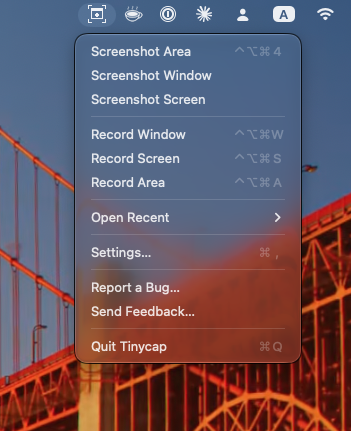
Pick a window, a screen or a dragged area, from the menu or a global shortcut. Window recordings follow the window when it moves. An optional 3-2-1 countdown and yellow click highlights are there for walkthroughs. While recording, the menu-bar icon shows the elapsed time; click it to stop.
Since v0.5, recordings can have sound. Sound is off until you turn it on, so nothing changes for a silent clip.
- System audio records everything your Mac plays, in window, area and screen recordings. Tinycap's own sounds are left out.
- Microphone lets you talk over the recording. Pick any input (built-in, USB, an audio interface or Bluetooth) from the Microphone menu, the bar under an area selection, or Settings. macOS asks for Microphone access the first time you turn it on.
- No speaker echo. The microphone goes through the same echo cancellation as FaceTime, so sound from your speakers does not play twice. Turn off "Reduce echo from speakers" for a studio mic or headphones.
When you stop, a preview opens, with sound. Untick System audio or Microphone to leave either out. Trim with handles or press I and O at the playhead, then export:
- MP4 as H.264 or HEVC, with a quality slider and a size of full, half or a fixed width. Sound is mixed into one track so it plays everywhere, including Chrome, Slack and GitHub; tick "Separate tracks for editing" to keep system audio and the microphone apart for a video editor.
- WebM as VP9, keeping the recording's real frame timing and tagged so browsers show the right colors.
- GIF with presets, a frame rate from 5 to 30, 32 to 256 colors, ordered dithering, and "Fit under N MB", which steps the settings down until the file fits.
WebM and GIF stay silent.
Before you export, Tinycap encodes a short sample of the clip to estimate the file size, so you know whether it will attach before you wait for the whole thing.
Screenshots
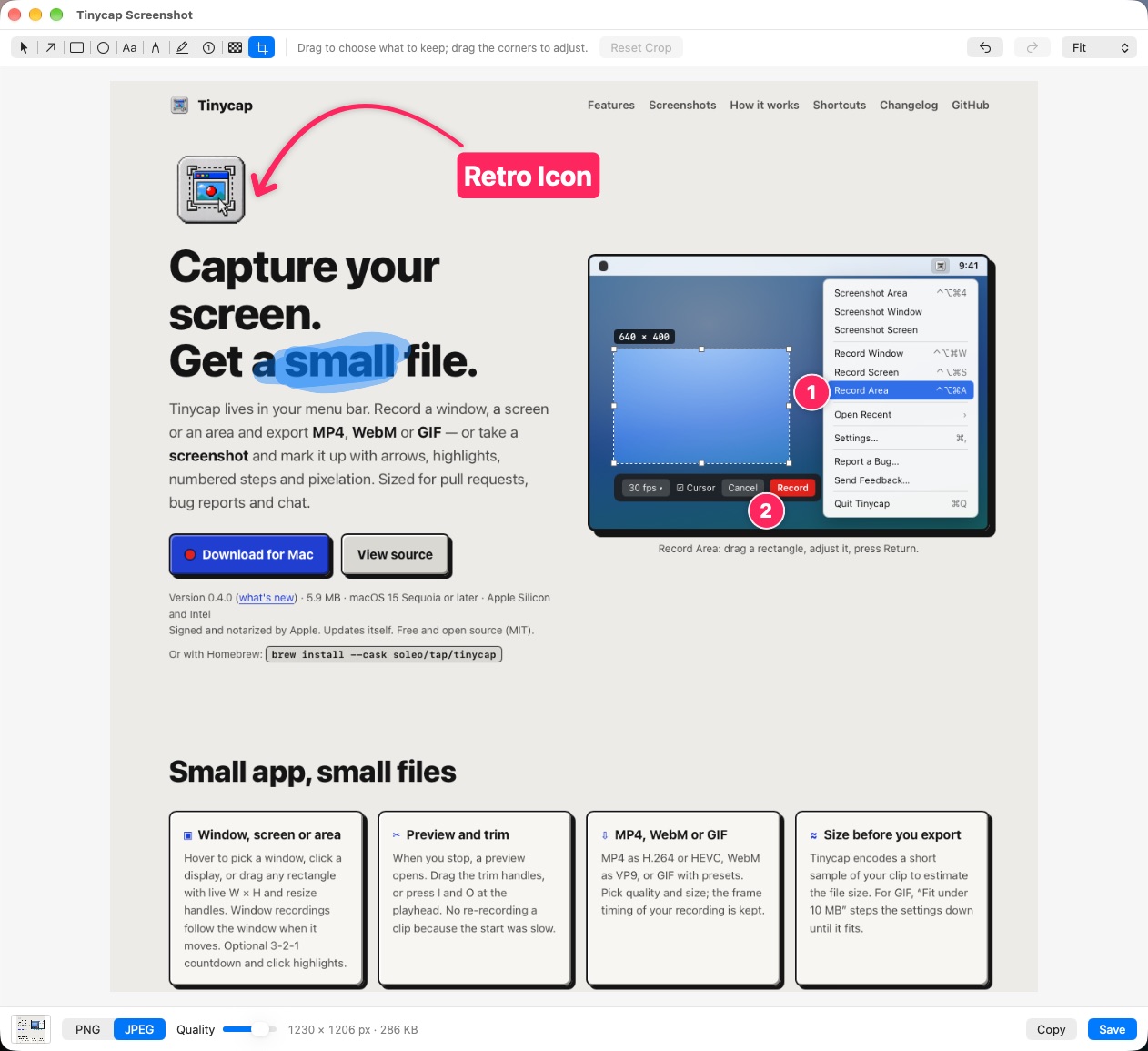
The same overlays take screenshots at full Retina resolution. After a capture, a floating thumbnail waits in the corner: click it to edit, drag it into any app, or leave it and it is saved. The editor has arrows that bend from the middle handle, rectangles and ellipses, text with an optional background, a pen, a highlighter, numbered badges that renumber themselves when you delete one, pixelation and crop. Each tool has a one-letter key. Export with ⌘C or ⌘S as PNG or JPEG, with no location or device metadata in the file.
Pixelate is the one I use most. The export replaces those pixels, so nothing can be recovered from the file.
The GIF encoder
The part of Tinycap I did not expect to write was a GIF encoder. The obvious choice, gifski, is AGPL, which fits neither an MIT project nor the App Store. So Tinycap has its own, written for screen recordings:
- One palette for the whole clip, built by median cut from frames across the kept range, so colors do not flicker between frames.
- After the first frame, each frame stores only the box that changed, with unchanged pixels transparent.
- Frames where nothing changed are merged into one longer frame.
- Ordered dithering that stays still between frames instead of shimmering.
Screen recordings are mostly static with small regions of change, and the encoder leans on that.
Install
Download the DMG from the latest release, or:
brew install --cask soleo/tap/tinycap
It is signed and notarized, runs on Apple Silicon and Intel, and updates itself. The direct build is sandboxed with a network entitlement for the update check, microphone access that macOS asks you about only when you turn the mic on, no camera, and file access only to your Movies folder and folders you pick. An App Store build, with no updater and no network access at all, is in App Review as I write this.
What the two have in common
I did not set out to write a pair, but the same rules fell out of both.
- One job. Bogyman does not launch agents. Tinycap does not edit video. Each one answers a single question and gets out of the way.
- Local only. Both keep everything on disk. Neither has an account, a server or analytics. Bogyman's hooks never print; Tinycap's files carry no metadata.
- Quiet about what they cannot see. Bogyman leaves cloud sessions off the list rather than guessing. Tinycap shows the estimated file size before you commit to an export.
- Output sized for the next step. Bogyman's JSON envelope is built for a script or another agent to read. Tinycap's files are built to fit a pull request or a chat upload.
- Reversible.
bogyman uninstallremoves only its own hook entries and leaves yours alone. Tinycap is a sandboxed app with no daemons or kernel extensions; drag it to the trash and it is gone.
Both were built in Claude Code sessions, with bogyman watching the sessions that built it. Bogyman went from the first commit to v0.3 in four days, 45 commits and about 8,000 lines of Rust. Tinycap went from the first commit to v0.4 in two days, 19 commits and about 11,000 lines of Swift including tests.
What four days of two tools cost
The experiment had a second question: how much does it take to ship software this way? Here is the ccusage report for the four days, from bogyman's first commit to Tinycap's App Store submission. The Tinycap days ran on Claude Opus 5.5 alone; the bogyman days ran mostly on Claude Fable 5.1, with some Opus 5.5 and Haiku 5.5. Cost is ccusage's estimate at API list prices.
| Day | Work | Output tokens | Cache reads | Total tokens | Cost |
|---|---|---|---|---|---|
| 26 October 2026 | bogyman v0.1 | 356,252 | 76,882,308 | 79,698,295 | $73.98 |
| 27 October 2026 | Tinycap v0.1 | 359,978 | 85,864,230 | 87,036,961 | $30.73 |
| 28 October 2026 | Tinycap v0.2 to 0.4 | 461,172 | 156,275,370 | 157,678,379 | $48.01 |
| 29 October 2026 | bogyman v0.2 and 0.3, Tinycap App Store | 231,577 | 52,273,087 | 53,432,293 | $23.65 |
| Four days | 1,408,979 | 371,294,995 | 377,845,928 | $176.37 |
Two things stand out. Almost everything is cache reads: the model re-reading the same project context on every turn, which is what a long session of small, reviewed changes looks like. And the whole of a signed, notarized, sandboxed menu-bar app with its own GIF encoder, four releases, a Homebrew cask and an App Store submission came to under $80 of model time over its two days. Both tools together, from nothing to v0.3 and v0.4, came to under $180.
What it did not cost was my attention on the code. Most of my time went into deciding what each tool would not do, and into reading the diffs. Which is, after all, the job.
What is next
For bogyman, the next thing to see is Claude Desktop Code tabs running over SSH or WSL. Local Cowork sessions are off the table for now: Cowork keeps its transcripts inside its VM's disk image, which bogyman cannot read, and a bogyman that cannot see under the bed stays quiet. For Tinycap, the next step is whatever App Review says.
If you run more than one coding agent at a time, try bogyman and tell me what it gets wrong: github.com/soleo/bogyman-cli. If you have ever uploaded a 40 MB screen recording to explain a one-line change, try Tinycap: github.com/soleo/tinycap.
This blog is written in a personal capacity and reflects my own perspective; it is not affiliated with or endorsed by my employer. All trademarks belong to their respective owners.