"Should we build native or hybrid?" is one of the oldest arguments in mobile. For most of the last decade the answer came down to one line on a spreadsheet: two native apps cost two teams, and one cross-platform app costs one. Everything else was a tie-breaker. After six months of shipping a Flutter app, I think that line was wrong in both directions.
I now have a clean data point on that question. GroceryTrack started on the web: I built the web app in a day in March. The mobile app came next, in Flutter. The first iOS version took a week, and a good part of that week went to code signing problems in the Flutter build. It went live on the App Store on April 30. On October 30 I started rewriting the iOS app in SwiftUI. Twenty-four hours later the native build was on TestFlight, installing over the Flutter app as an update to the same App Store listing.
Then I measured both builds side by side. This post is what I learned.
The short answer
| Metric | v1 · Flutter 1.10.0 | v2 · SwiftUI 2.0.0 | Change |
|---|---|---|---|
| Download size, universal | 58.4 MB | 32.9 MB | −44% |
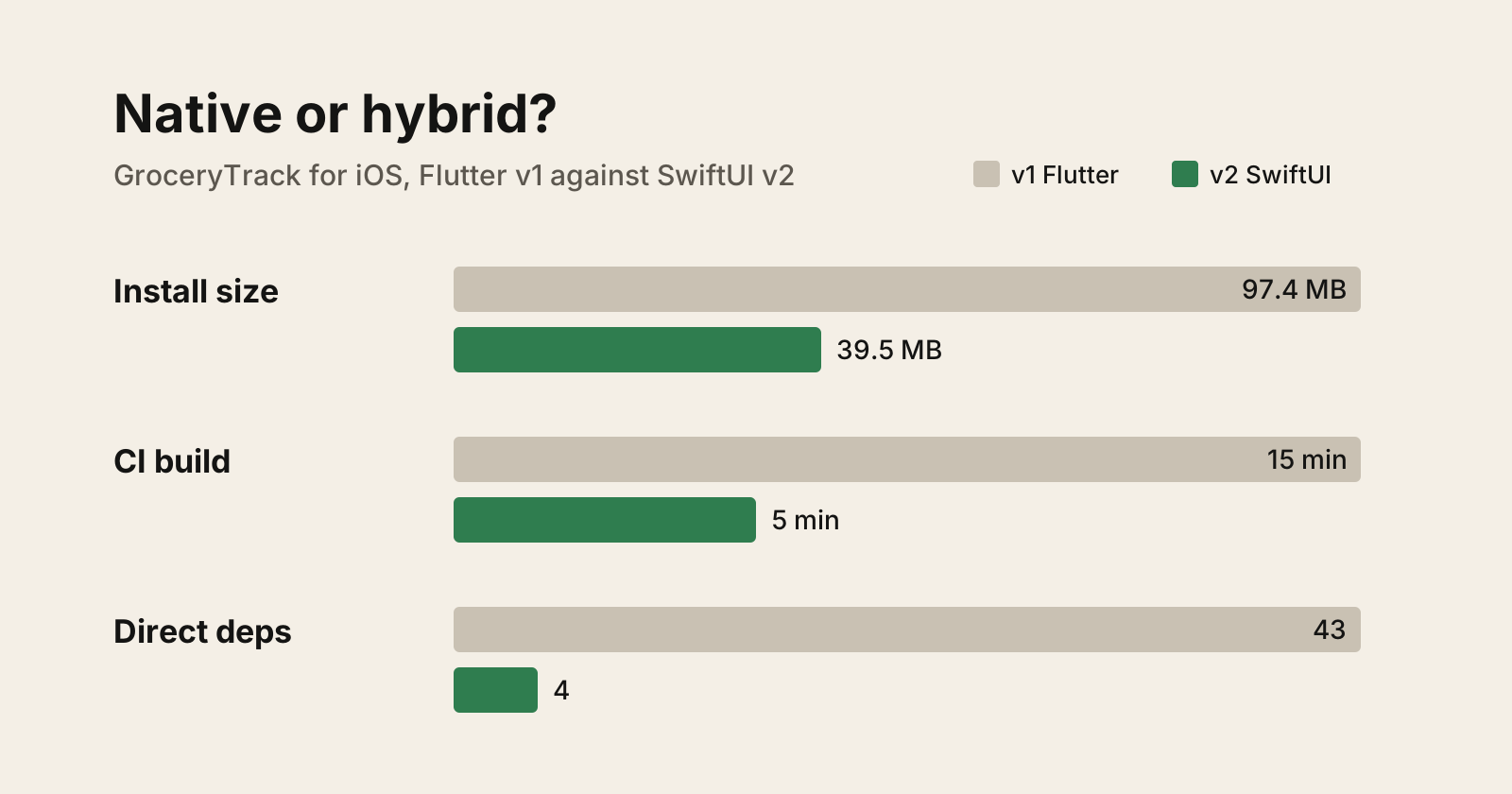
| Install size, universal | 97.4 MB | 39.5 MB | −59% |
| Download size, device-thinned | 28.4 MB | 14.8 MB | −48% |
| Xcode Cloud build, median | 15 min | 5 min | 3x faster |
| Memory in use (debug gauge) | 289 MB | 115 MB | −60% |
| App code | 33,421 lines Dart | 18,557 lines Swift | −45% |
| Direct dependencies | 43 | 4 | −91% |
| Minimum iOS | 15.6 | 18.0 | 2 versions up |
Native won on almost everything you can measure about the app itself. But the Flutter app never felt slow to use, the rewrite did not change the thing users wait on most, and the shared codebase was never as shared as it looked. Those matter more than the table suggests.
The bigger lesson is about speed. Building native took me no longer than building in Flutter had. That is why I would start native next time.
Why I picked Flutter in the first place
In March I did not know whether anyone besides me wanted a receipt scanner. Flutter looked like the right call for that question:
- One codebase, two stores. iOS and Android came from the same Dart code.
- A wide net on iOS versions. Flutter let me support iOS 15.6 and up. I did not know which iOS versions my users ran, and I did not want to guess a minimum version before I had any users. Shipping wide first meant the App Store data would tell me where to set the floor later.
- Fast enough. Scrolling, taps and transitions felt snappy. Nobody ever told me the app felt slow, and I never did either.
- A plugin for everything. Camera, document scanning, charts, share sheet, biometrics,
subscriptions: each was a
pubspec.yamlline away. - The hard part was not the client. The work that made GroceryTrack possible is a Gemini call that turns a photo into structured JSON. The app is mostly forms, lists and charts around it.
On iOS that bet paid off. Together with the web app, it brought the first hundred users, including a cluster of Canadians I never planned for.
Android took far longer, and the delay was not about code. The first Android build went to a closed beta on May 10. I assumed it would be public within a month. It took five. Google requires a new developer account to run a closed test with at least 12 testers for 14 days before it can apply for production access. My first application was rejected on September 21: not enough testing, and testers who were not engaged. I re-ran the test with real release notes, the fixes testers asked for, and a dozen testers who kept scanning, then applied again. GroceryTrack went public on Google Play on October 10. The whole story is in Seven Months of GroceryTrack.
The Flutter build was never the bottleneck. Recruiting testers and keeping them engaged was. Shared code got me a second app. It did not get me a second store.
One codebase is not one platform
The promise of a shared codebase is that you write a feature once and it works on both phones. In practice I spent more of my time on Android-specific issues than on anything else in the app, even though the Dart code was the same.
Sharing code does not mean every feature works on both platforms by itself:
- Plugins behave differently underneath. The Dart API is the same, but the camera, document scanner, share intake, notifications and file permissions each sit on a different native implementation. Bugs live in that layer, and they are rarely the same bug on both sides.
- You still need the device. When a feature or a bug report was Android-specific, I had to find an Android phone to test it. Passing on an iPhone tells you nothing about Android.
- Your attention does not split. At any given time I could focus on either Android or iOS, not both. Time spent on an Android issue was time the iOS app did not move. The code was shared; my focus was not.
So the spreadsheet line was off from the start. One cross-platform app does not cost one platform's worth of work. It costs one codebase plus the testing, debugging and focus for each platform you ship.
What changed: the rewrite stopped being expensive
The old argument assumes a rewrite costs a quarter. This one took a day. The SwiftUI repo has 72 commits between the evening of October 30 and the evening of October 31, and 68 of them were written with Claude.
That speed was not luck. A port is close to the ideal agent task, because the old app is a complete, running specification:
- Every screen already existed. "Port
history_screen.dartto SwiftUI" has an exact answer. The porting guide maps each Dart file to its Swift file, model by model. - The data had to stay identical. v2 opens v1's SQLite file in place and migrates the schema.
It reads the same
flutter.*UserDefaults keys. Firestore documents, API payloads, request headers and every analytics event are byte-for-byte the same. Those constraints gave every change a pass/fail check. - I did the editing, not the typing. My job was deciding what to keep, reviewing diffs, and testing on a device. That is the shift I wrote about in The Engineer Becomes the Editor.
When the port costs a day, the spreadsheet line that decided the old argument mostly disappears. What is left are the costs you pay every day after launch: build time, binary size, dependency upkeep, and how well the app fits the platform.
It also undercuts the reason I picked Flutter. The first Flutter iOS app took me a week, much of it spent on code signing. v2 took a day in SwiftUI, with more features than v1 ever had. That comparison flatters the port, which had a finished app to copy, and agents got better between March and October. Even so, Flutter did not make the first build fast, and the native build did not need a framework's help to be quick.
Where native won
Size
Install size dropped from 97.4 MB to 39.5 MB. The download a user actually fetches, the device-thinned build, halved from 28.4 MB to 14.8 MB.
The interesting detail is that v1's install size barely moved with thinning (97.4 to 94 MB). Most of its weight was the Flutter engine and shared assets, not per-device slices. There is no Flutter engine in v2.
Build time
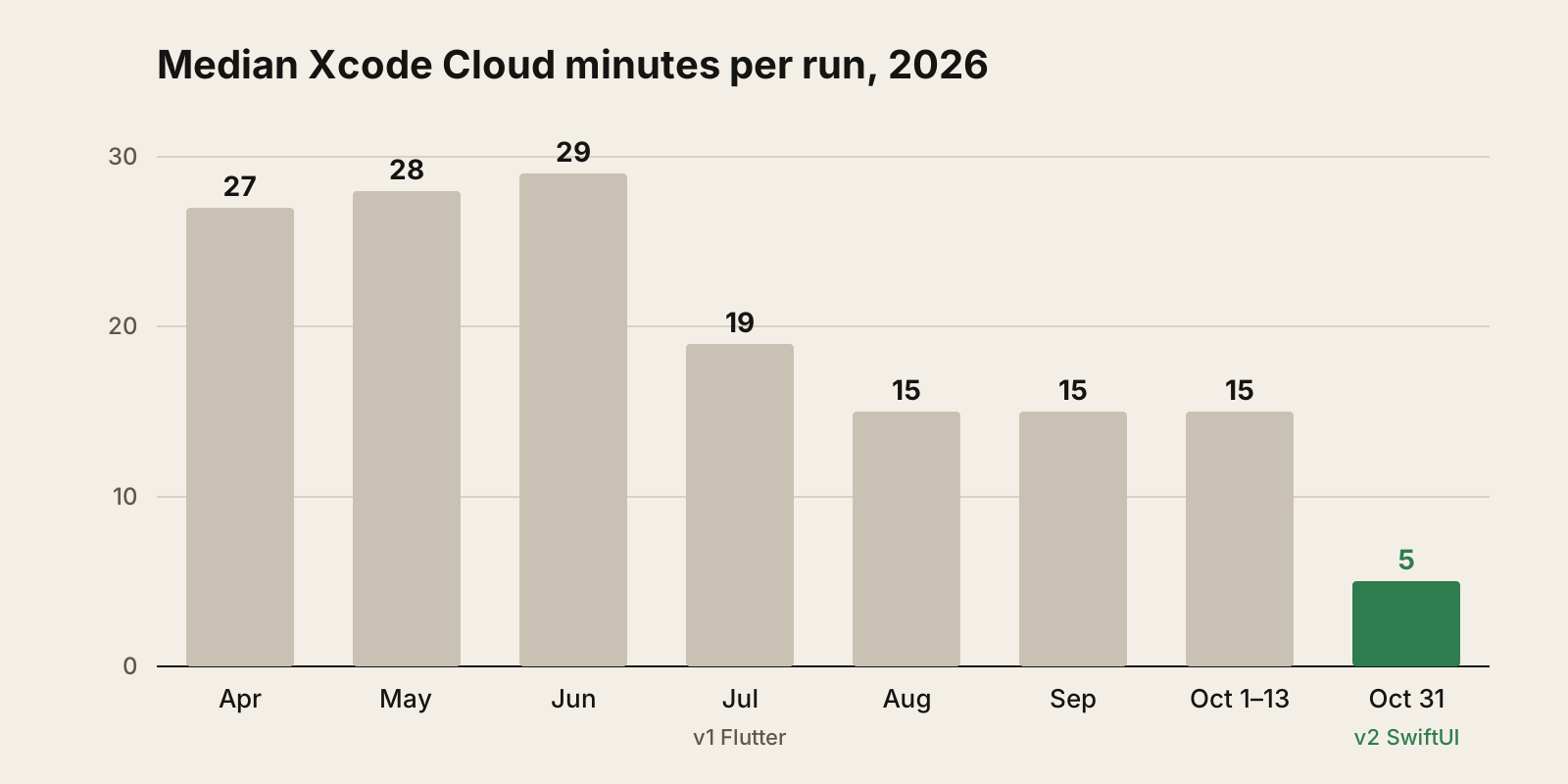
Every v2 build took 4 to 5 minutes. v1's best steady state was 15 minutes, and in spring it ran 27 to 29. Over its life v1 used 1,946 Xcode Cloud minutes across 125 runs, about 32 hours of CI.
The same CI budget now buys about 3x as many builds, and that changed how I worked right away: 17 v2 builds landed on TestFlight on October 31 alone. When a build takes five minutes, you ship small changes and test them on a real phone. When it takes thirty, you batch.
The speedup comes from what left the build: CocoaPods, Ruby, fastlane and the Flutter toolchain.
Dependencies
v1 had 43 direct packages and 230 once you count what they pull in. v2 has 4: Firebase, Google Sign-In, RevenueCat and Sentry. That resolves to 18 packages in total.
Everything else became an Apple framework:
| Job | v1 · Flutter plugin | v2 · Apple framework |
|---|---|---|
| Document scanning | cunning_document_scanner | VisionKit |
| Photo picking | image_picker | PhotosPicker |
| Charts | fl_chart | Swift Charts |
| Biometrics | local_auth | LocalAuthentication |
| Share-sheet input | receive_sharing_intent | Share extension |
| Splash animation | Lottie | SwiftUI animation |
| Category icons | flutter_svg | SF Symbols |
Each plugin was a bridge someone else maintains, between my code and an API Apple already ships. Fewer bridges means fewer things that break on an iOS upgrade.
Memory
Xcode's debug gauge on the same Mac showed v1 at 289 MB and v2 at 115 MB. v1 jumped to about 180 MB at launch and kept climbing as screens opened. v2 held near 90 MB for two minutes, then leveled off at 115 to 125 MB.
Treat that as an upper bound. A debug Flutter build runs the Dart VM in JIT mode with debug services, which inflates memory more than a debug Swift build does. The fair test is release builds of both on the same iPhone in Instruments, which I have not run yet.
It is also a gap you see in Xcode, not in your hand. The Flutter app felt just as responsive to use. If the only reason to go native is that the app feels slow, check that it actually does first.
Features that were easy only because the app was native
This is the part the size tables miss. In the same 24 hours, v2 picked up things v1 never had:
- Ask by voice, through the Speech framework, on device where the language supports it.
- French and Spanish, from String Catalogs across the app, the widget and the permission prompts.
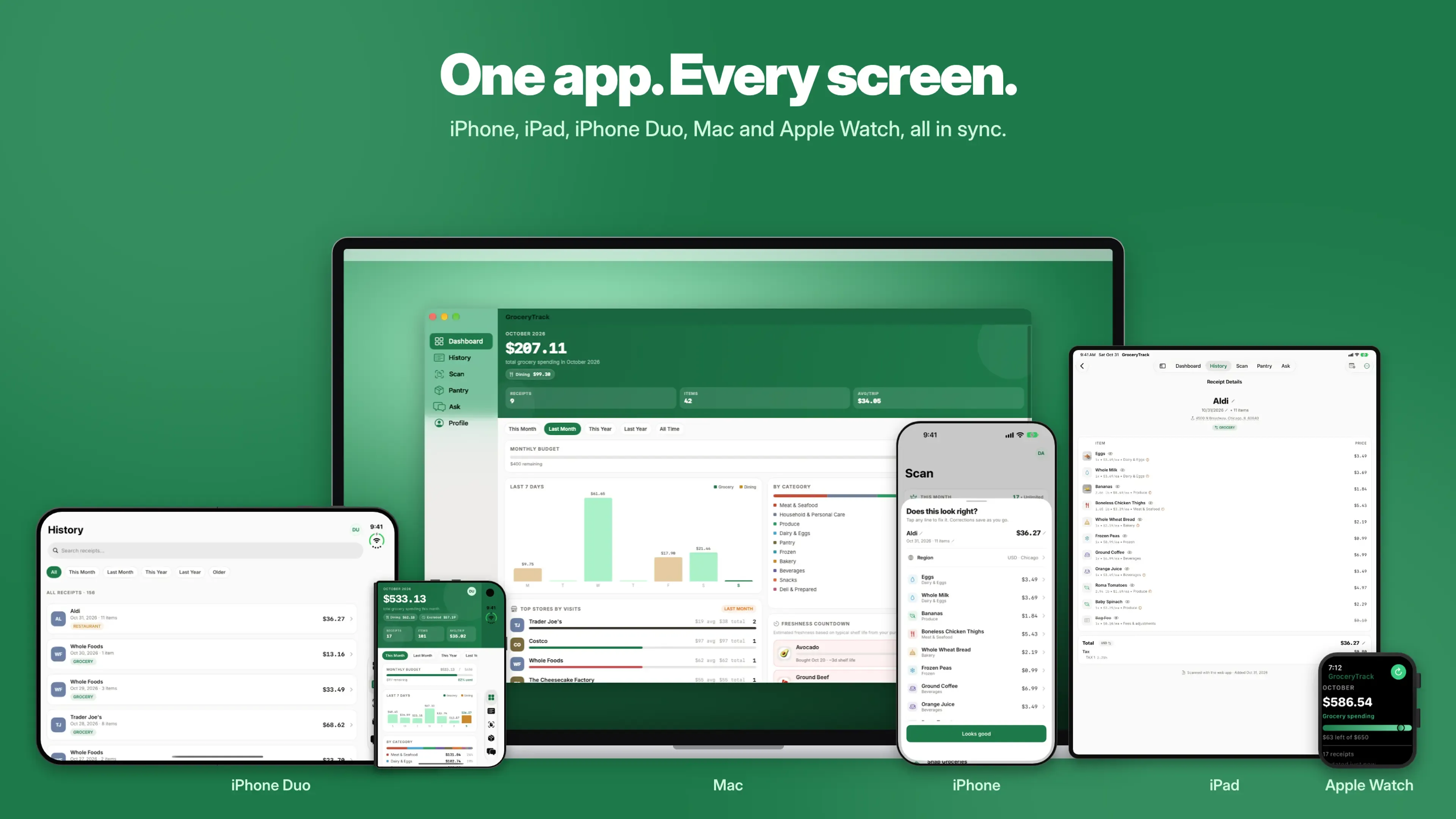
- An Apple Watch app and complication showing this month's spending against the budget.
- A Mac app, from the same iOS target through Mac Catalyst.
- "Open in GroceryTrack" for PDFs and images from Files.
None of these is impossible in Flutter. But each one would have been a plugin search, a platform channel, or a native module bolted onto the side. In SwiftUI they are the default path.
New platform UI without waiting
Staying on Flutter also meant waiting for every new piece of Apple's UI. Flutter draws its own widgets instead of using the system's, so when iOS introduces a new look, a Flutter app does not get it until someone rebuilds it in Flutter.
I ran into this with the glass navigation in iOS 26. I tried to get the glass effect on GroceryTrack's navigation bar in Flutter, could not make it look or feel right, and gave up. v1 shipped with Material widgets instead, so on an iPhone it looked like an app from somewhere else.
In SwiftUI the same navigation took no work. A TabView and a NavigationStack pick up the
current system style, toolbar and sheet behavior included, and they will pick up the next one too.
When Apple changes the design language again, the native app moves with it on day one.
Where native did not matter
GroceryTrack's slowest moment is a receipt scan. Server processing takes a median 6.4 seconds for iOS image scans, with a p95 of 19.4 seconds. The one fully traced v2 scan took 5.5 seconds end to end: 4.8 seconds on the server and 0.6 seconds for upload and network.
The server work, Gemini extraction plus Firestore writes, is the same for both apps. A client rewrite can only touch the 0.6 seconds around it.
Network and disk timings in Sentry told the same story. Analytics posts, local file reads and writes all matched within noise. They are bound by the server and the device, not by the UI framework.
If your app is slow because the server is slow, rewriting the client will not fix it. Find out where the time goes before you pick a framework to blame.
What I gave up
A fair comparison has to list the costs too.
- Android stays on Flutter. I now maintain two clients. v1's line count covers iOS and Android, so the "45% less code" comparison is a two-platform codebase against a one-platform one. My total code went up, not down.
- iOS 15 to 17. The iOS 18 floor buys Observation, Swift Testing and modern toolbar and sheet behavior with no compatibility branches. It costs those users. From the App Store data for September 2 to October 12, devices on iOS 15.6 to 17 made 4 of 125 Get taps (3.2%) and 0 of 48 app opens. For GroceryTrack that is a cheap trade. For an app with an older audience it may not be. I could only make this call with numbers because v1 shipped wide: six months of real installs on iOS 15.6 and up showed me who I would lose before I lost them.
- Tests. v2 has 211 test cases against v1's 422, and under a third of the test code. The golden screenshot tests did not come across; v2 tests logic only. A port moves fast partly because it skips this.
- Fastlane. v2 ships through Xcode Cloud only.
- New bugs. TestFlight found a crash on the first tap of the voice button, inside the speech permission reply. The simulator never showed it because it grants permission without a round trip. It also found hangs of 5 to 21 seconds, one pointing at date parsing on the main thread. A rewrite resets the bug count to "unknown", even when the old app was stable. All of these were fixed before the build went to review.
What I could not measure yet
Some numbers are missing, and I would rather say so than guess.
- Launch time. v1 shows a 318 ms p50 cold start in Sentry. v2 sends no app-start or screen-load spans yet, because Sentry's automatic tracing hooks into UIKit view controllers and a pure SwiftUI app gives it nothing to attach to. I need to add SwiftUI screen tracing and wait for real users.
- Crash-free sessions, hang rate, energy. These need a few weeks of v2 installs in Xcode Organizer and Sentry release health.
Every v2 runtime number in this post comes from a handful of TestFlight testers. They are early signals, not conclusions.
So which should you build?
My answer changed while writing this post. I used to think React Native and Flutter were the fast way to prototype: write it once, put it in both stores, learn what users want. With agents writing most of the code, I do not think that holds any more.
The code reuse those frameworks sell saves typing, and typing is the part that got cheap. What they do not save is the part that stayed expensive: testing on each platform, debugging each platform's plugins, and the focus to work on one platform at a time. And the costs they add, from bigger installs and slower builds to more dependencies and waiting for new system UI, start on day one.
So from now on I would build native from the start:
- Start with the platform your users are on. For GroceryTrack that is iOS, so SwiftUI.
- Port to the second platform when users ask for it. Use the first app as the spec, the way v1 was the spec for v2. A running reference app plus identical wire formats is the best porting setup an agent can get.
- Share code on the server, not in the client. GroceryTrack's hard parts, receipt extraction, sync and Ask, already live behind an API that every client calls. That is the code worth sharing, and it is already shared.
- Cast a wide net with the deployment target, not the framework. If you want data on OS versions before picking a minimum, ship the first native version with a lower floor and raise it when the numbers say so. You give up some newer APIs for a while, but you keep the native app.
Cross-platform still makes sense in a few cases:
- Your team knows React, not Swift or Kotlin, and the app shares a lot of client code with a web app. That is React Native's best case.
- The app is mostly content, with little that touches the platform.
- Nobody on the team can review Swift or Kotlin. An agent can write it, but someone still has to judge whether it is right.
I have only tested half of this. GroceryTrack's Android app still runs on Flutter, and a native Android port is the obvious next test.
If you rewrite:
- Make it a drop-in update. Same bundle id, same database file, same preference keys, same wire formats. Users should not notice anything except that the app got better.
- Treat the old app as the spec. It is the best prompt an agent will ever get.
- Measure before you announce. Pull sizes from App Store Connect, build minutes from the CI export and timings from your tracing tool. Write down what you could not measure.
- Budget for tests. The port is fast. Getting the safety net back is not.
What I would tell myself in March
I would start native. Not because Flutter was slow: it was snappy. But the Flutter app took a week to reach its first iOS build, much of it spent on code signing, and the SwiftUI app took a day. Native would not have been slower, and it would have skipped everything that came after.
The wide net on iOS versions was worth having, and it gave me the data to pick iOS 18 instead of guessing. A native app with a low deployment target would have given me the same data.
I would warn myself about Android. The shared codebase did not make the second platform free. It made it cheaper to write and just as expensive to test, debug and think about.
And I would change the mental model. I treated the framework as a permanent choice, so I weighed it as if switching later would cost months. With agents, switching cost a day. The lasting costs were the ones I was not weighing: the 15-minute builds, the 97 MB install, the 230 packages, every platform feature that needed a bridge, and every new piece of system UI I had to wait for or give up on.
Cross-platform frameworks used to be the fast way to prototype. With agents, native is just as fast to write, and it skips the costs that come later.